DocumentationZotico Custom Images
Live examples, images and plain-English explanations.
Overview
Zotico Custom Images is not "just another image plugin". It is a set of tools that WordPress developers were missing: additional sizes, WebP/AVIF, video posters, and beautiful galleries — without mess and conflicts.
Installation
- Download zotico-custom-images.zip from the releases page
- In WordPress admin, go to Plugins → Add New → Upload and select the zip
- Activate the plugin. After activation, a menu item Settings → Zotico Images will appear
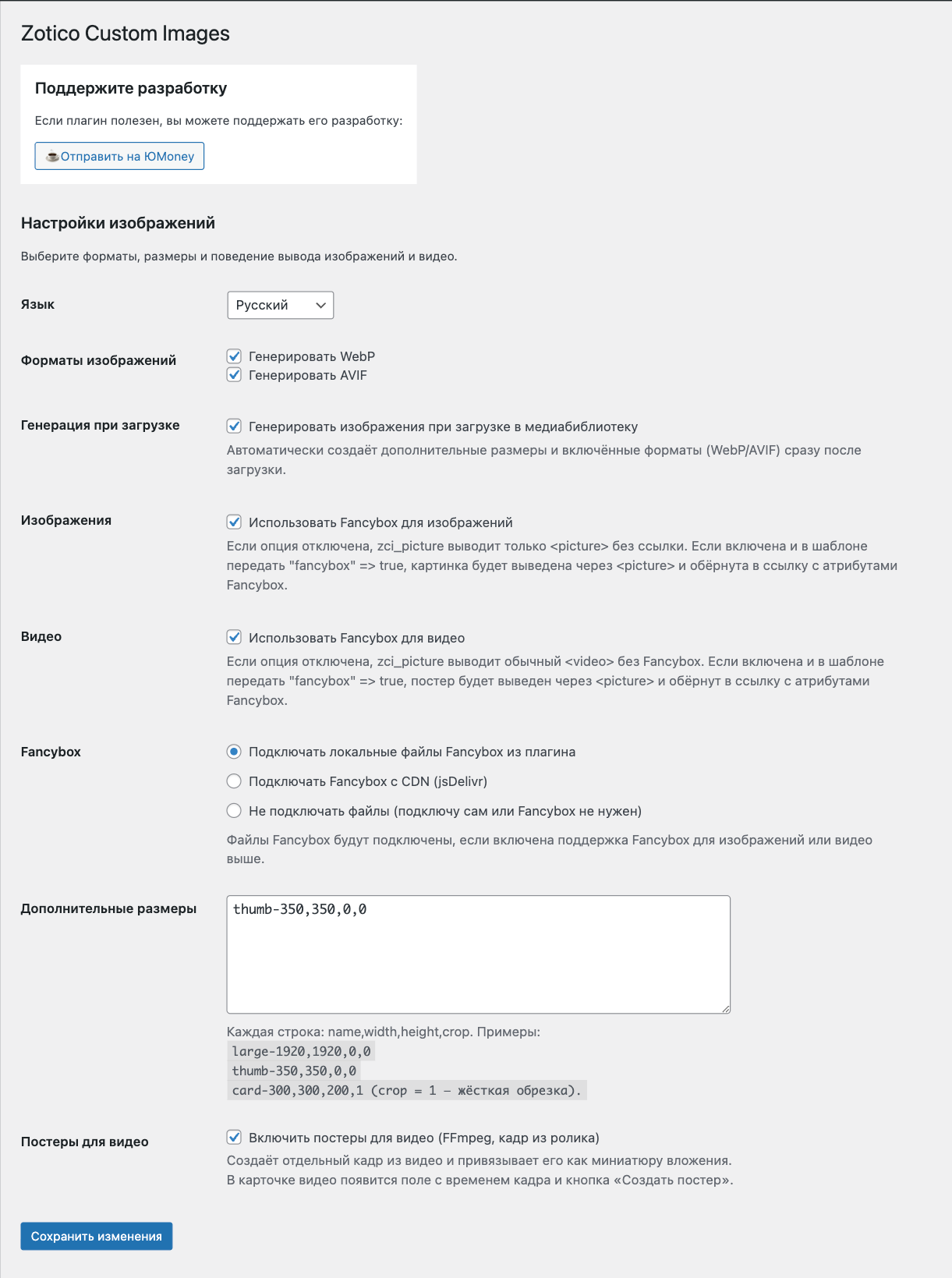
- Go to settings and select language, formats, and sizes. Save
Settings
Interface Language
RU / EN. Switches all labels in admin and media library without .mo files.
// Example: English'language' => 'en'
Image Formats
- WebP — almost always supported, reduces size by 25–30%
- AVIF — even smaller, but requires PHP 8.1 + GD/Imagick with AVIF
If server does not support — checkbox will be automatically unchecked
// Enable both'formats' => ['webp' => 1,'avif' => 1,]
Additional Sizes
Each line: name,width,height,crop. If left empty — three defaults will be connected: large-1920, thumb-350, medium-768.
// Exampleslarge-1920,1920,0,0thumb-350,350,0,0card-300,300,200,1
Generate on Upload
If enabled — plugin immediately creates all selected sizes and formats for new images. If disabled — do manually in attachment card.
Fancybox
- Do not connect — you connect scripts/styles yourself
- CDN — loads Fancybox 6 from jsDelivr
- Local files — taken from plugin folder assets/fancybox
Below are toggles "Use for images" and "Use for video". If both disabled — Fancybox files are not connected at all.
Video Posters
Adds "Create poster" button to video card. Requires FFmpeg and allowed exec(). If either is missing — option is automatically disabled and shows hints what to do.
Usage Examples
1. Simple Image Without Gallery
<?phpzci_picture( 123 );
Outputs <picture> with default size thumb-350, without link wrapper.
<div class="zci-picture"><picture><source type="image/avif" srcset="image-350x233.avif"><source type="image/webp" srcset="image-350x233.webp"><img class="zci-picture__img" src="image-350x233.jpg" alt="..." width="350" height="233" loading="lazy" decoding="async"></picture></div>
2. Image + Fancybox Gallery
<?phpzci_picture( get_post_thumbnail_id(), ['img_size' => 'thumb-350','fancybox' => true,'fancybox_prefix' => 'article-gallery',] );
Wraps in <a data-fancybox="article-gallery">. All images with same prefix will be in one gallery.
<a class="zci-picture-link" href="image-full.jpg" data-fancybox="article-gallery" data-caption="Caption from media library" data-thumb="image-350x233.jpg"><picture><source type="image/avif" srcset="image-350x233.avif"><source type="image/webp" srcset="image-350x233.webp"><img class="zci-picture__img" src="image-350x233.jpg" alt="..." width="350" height="233" loading="lazy"></picture></a>
3. Responsive Image (Smaller on Mobile)
<?phpzci_picture( $image_id, ['img_size' => 'large-1920','media_sources' => [[ 'media' => '(max-width: 640px)', 'size_key' => 'thumb-350' ]],] );
On screens ≤640 px, thumb-350 will be used, saving traffic.
<div class="zci-picture"><picture><!-- For mobile (≤640px) --><source media="(max-width: 640px)" type="image/avif" srcset="image-350x233.avif"><source media="(max-width: 640px)" type="image/webp" srcset="image-350x233.webp"><source media="(max-width: 640px)" srcset="image-350x233.jpg"><!-- For desktop (default) --><source type="image/avif" srcset="image-1920x1280.avif"><source type="image/webp" srcset="image-1920x1280.webp"><img class="zci-picture__img" src="image-1920x1280.jpg" alt="..." width="1920" loading="lazy"></picture></div>
4. Video with Poster and Fancybox
<?phpzci_picture( $video_attachment_id, ['fancybox' => true,'fancybox_prefix' => 'videos',] );
FFmpeg takes a screenshot, poster is displayed, click opens video in Fancybox.
<a class="zci-video-link" href="video.mp4" data-fancybox="videos" data-thumb="video-poster.jpg"><img class="zci-video-poster" src="video-poster.jpg" alt="..." loading="lazy" decoding="async"><span class="video-play-btn" aria-hidden="true"></span></a>
5. Custom Data Attributes for Fancybox
<?phpzci_picture( $id, ['fancybox' => true,'fancy_attrs' => ['data-caption' => 'Custom caption','data-speed' => '300',],] );
<a class="zci-picture-link" href="image-full.jpg" data-fancybox="gallery" data-caption="Custom caption" data-speed="300" data-thumb="image-thumb.jpg"><picture><source type="image/avif" srcset="image-thumb.avif"><source type="image/webp" srcset="image-thumb.webp"><img class="zci-picture__img" src="image-thumb.jpg" alt="..." loading="lazy"></picture></a>